
The watch dashboard is – like all other dashboards in NMEAremote – completely generic and defined by a JSON configuration.
Even when there is an intuitive dashboard editor available in the future (what I’m working on right now) it is an easy and handy option to customise and control the dashboard.
Special for different setups, configurations or necessary values like a dedicated config for the bowman, one for the trimmers, tactician,…
JSON is a simple, “self-describing” and easy to understand format which could be edited with any text editor.
But you’ll need to respect the syntax especially with brackets, commas,…
If there is an error with these files there is mostly missing a comma or one is too much.
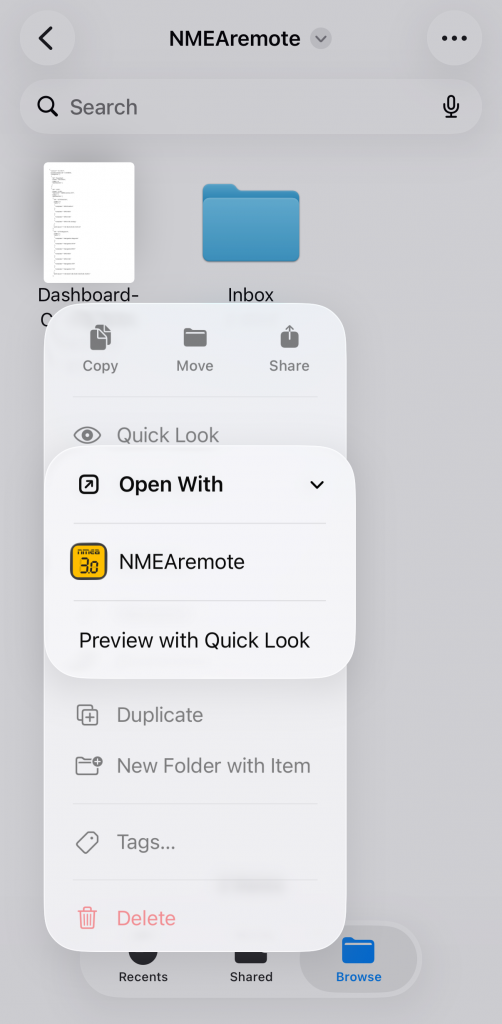
To import a JSON config file it has to be copied to the watch’s companion iPhone by the “Folder” app and iCloud sync or an e-mail and opened with NMEAremote with the “Open With” option.
This will start NMEAremote and import the config file.
If successful you will see a message that the dashboard has been updated and next time when the watch app opens and connects to NMEAremote the dashboard will be updated.
Dashboard JSON Scheme
Here is a small excerpt from the default watch dashboard to show how the JSON scheme is defined:
{
  "ID": "WATCH",
  "categories": [
    {
      "ID": "Speed",
      "dashboards": [
        {
          "grid-layout": "{12,24}",
          "ID": "Watch.Speed",
          "index": 1,
          "items": [
            {
              "template": "Velocity.Speed",
              "layout": 2
            }
          ]
        }
      ]
    }
  ]
}
| Key | Comment | |
|---|---|---|
| ID | WATCH | mandatory for the Watch dashboard |
| categories | List of dashboard rows | |
| ID | ID of the category | |
| dashboards | List of dashboard pages | |
| grid-layout | Layout of each page’s value readouts/views | Grid of 12×24 |
| items | List of value views | |
| template | The template for the value view | referenced to Templates.json |
| layout | The layout of the value view | Specifies the layout of title, unit and value |
Templating
The items itself are referenced by the “template” key to the Dashboard-Templates.Watch.json file where all available value views are listed.
There are templates like:
- Velocity.Speed
- Sounder.Depth
- Navigation.BTW
- Performance.VMG
These templates are defining the specific value view in detail and could be overwritten in the dashboard config file.
grid-layout
Each dashboard page has a grid-layout property with a grid of 12×24
The entry "grid-layout": "{12,24}” defines one value in fullscreen.
For a two row layout e.g. you should set "grid-layout": "{12,12}:{12,12}"
Last but not least you should have a look into the default watch config for a deeper investigation: Dashboard-Config.Watch.json